
Stories

Ashok rai
13 Apr 2024
The Synth Look and Feel (The Synth Architecture)
It can be difficult to change an existing look and feel or to create a custom one. It takes a lot less work to develop a unique appearance and feel with the javax.swing.plaf.synth package. A Synth look and feel can be produced programmatically or by using an external XML file. The next discussion focuses on using an external XML file to create a synth look and feel. The documentation for the API talks about how to create a Synth c programmatically. The Synth feel and look give you the "look." It is the synth that gives the "feel." The Synth L&F can therefore be thought of as a "skin."
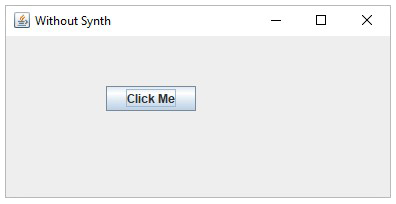
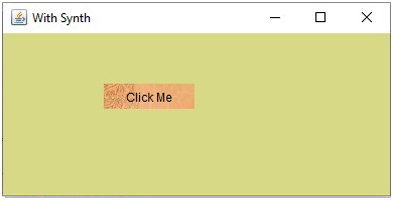
I am gonna demonstrate a basic difference between Default java looks and "synth look and feel"
1. Normal java code to create JFrame and JButton.
javax.swing.*;
normalSwing {
normalSwing()
{
JFrame frame = JFrame("Without Synth");
frame.setDefaultCloseOperation (JFrame.EXIT_ON_CLOSE);
frame.setLayout();
frame.setSize(400,200);
JButton button = JButton("Click Me");
button.setBounds(100,50,90,25);
frame.add(button);
frame.setVisible();
}
public static void main(String args[])
{
new normalSwing();
}
}
Output:
 2. Using Synth Looks
2.1. Creating withSynth.java
2. Using Synth Looks
2.1. Creating withSynth.java
/** * @(#)withSynth.java * * * @author Ashok Rai * @version 1.00 2025/3/16 */
javax.swing.*; javax.swing.plaf.synth.*; class withSynth { public withSynth() { SynthLookAndFeel lookAndFeel = SynthLookAndFeel(); try { lookAndFeel.load (withSynth.class.getResourceAsStream ("buttonSkin.xml"), withSynth.class); UIManager.setLookAndFeel(lookAndFeel); } catch (Exception e) { e.printStackTrace(); } JFrame.setDefaultLookAndFeelDecorated (); JFrame frame = JFrame("With Synth"); frame.setDefaultCloseOperation (JFrame.EXIT_ON_CLOSE); frame.setLayout(); frame.setSize(400,200); JButton button = new JButton("Click Me"); button.setBounds(100,50,90,25); frame.add(button); frame.setVisible(); } public static void main(String[] args) { new withSynth(); } } 2.2. Creating buttonSkin.xml
<?xml version="1.0" encoding="UTF-8"?>
<!--
Document : buttonSkin.xml
Created on : 2025/3/16
Author : Ashok Rai
-->
<synth>
<style id="backingStyle">
<opaque value="TRUE"/>
<font name="Dialog" size="12"/>
<state>
<color value="#D8D987" type="BACKGROUND"/>
<color value="BLACK" type="FOREGROUND"/>
</state>
</style>
<
More Stories
In Java, why am I utilizing C or C++? What is .dll file? Is it worth making?
If you're unfamiliar with this technology, Java Native Interface, or JNI, is a standard Java method that enables C and C++ code to communicate with Java code. JNI enables programmers to write native m......
Ashok rai [15 Apr 2024]
1
IRC Client & Server connection using Java
People frequently tell me that IRC is no longer relevant. Why do people still use IRC? I'm trying to show in this post how IRC works using Java. My main focus will be on connecting to other IRC client......
Ashok rai [12 Apr 2024]
IRC Messenger using Java
I'm attempting to demonstrate how IRC Messenger functions with Java in this post. Using IRC Server to connect and deliver messages to other IRC clients will be my primary emphasis.......